Review Comments (0) Screenshots (5) Questions & Answers (0) Votes (0) Awards (8) Wiki  
-Please log in to rate
0 0/5 (0)
-OziPhotoTool
-2.8
- www.oziphototool.com
- 14 people
Download OziPhotoTool

19.82 MBDownloaded 104 times


Review

This is a quick review

OziPhotoTool combines the technology of a GPS receiver and a digital camera to automatically keep a record of where digital photos were taken. It is designed to be used in conjunction with OziExplorer. Most digital cameras have EXIF metadata stored as part of the photo. This includes is the date and time the photo was taken. Many GPS units have 'tracklogs'. The GPS keeps a record of points that the unit has traveled over, including the time at each point. OziExplorer can read tracks from many different GPS units. OziPhotoTool takes the digital photos with EXIF metatdata, and tracks from OziExplorer to determine where the GPS was when the photo was taken. As long as the GPS was in the same location as the camera this represents the location of the photo. OziPhotoTool outputs the linkage between the photo and its location by creating an OziExplorer waypoint file, generating map features on OziExplorer maps, watermarking the photos, embedding exif information in the photos, generating HTML output or generating Google Earth kml/kmz files. Check http://www.oziphototool.com/download.html for smaller download options
 
The following full-length review applies to version 2.7

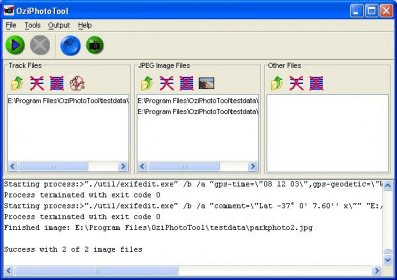
OziPhotoTool 2.7 is the latest version of this freeware program developed by OziPhotoTool. We can download it from the developer's website and use without limitation, on a private and non-profitable basis. Otherwise, we must purchase the license. OziPhotoTool needs a registered version of OziExplorer 3.95 or later to be installed for most of its features to work. At least the input track files must be in the OziExplorer format. This program has been designed to help us to locate in a generated map where and when a photo has been taken. It uses both digital camera and GPS receiver technologies. The GPS device and the digital camera must be in the same location at the time of taking the picture. It features a comprehensive guide manual, support and online forum. From the main window, we can import one or multiple images in .jpg format and tracks, from anywhere in our directory. Once added, we can preview and remove them. We can open the Time Delta Manager option to calibrate the time, configure the Generation Settings: Waypoint, Map Feature, OziExplorer Interface, Copied Images and External Execution, as well as several advanced features, such as string replacement codes, watermark properties, etc. OziPhotoTool can generate HTML data to add to the waypoint file when displayed in the browser.
Advantages
  • Save a lot of working time.
  • Accurate tracker.
Disadvantages
  • It needs a registered version of OziExplorer to be installed.

Reviewed by: Maria José Carrasco Zamora

Reviewer rating: Editor's rating 5

Screenshots

Main Window Main Window Product Website Product Website Opening Window Opening Window Time Delta Manager Time Delta Manager
All 5 screenshots

Latest comments


There are no comments, be the first one!
Add new comment
Tag cloud
Download siClient

Email Address:

Password:

Register now »

Forgot password?

Copyright © 2009, Informer Technologies, Inc. About| Privacy and terms| Help| Feedback